
Connect to Personal WeChat via Gewechat
WARNING
The Gewechat project has stopped maintenance, please do not use it.
This tutorial requires LangBot to be deployed as a Docker container, please deploy LangBot to Docker according to the LangBot deployment documentation.
INFO
- It is recommended to deploy on Ubuntu Linux system.
- Recommended to use Alibaba Cloud, server prices as low as 38 yuan per year, with an additional 20% discount, choose Ubuntu 22.04 or 24.04 as the system.
Create Docker Network
We need to deploy Gewechat and LangBot to the same Docker network to facilitate their communication.
docker network create langbot-networkAdd network configuration to the docker-compose.yaml file in the LangBot directory (add to the services.langbot field, and add the langbot-network network configuration under the networks field):
services:
  langbot:
    ...
    networks:
      - langbot-network
    ...

networks:
  langbot-network:
    external: true
In the next step when deploying Gewechat, please add an additional network configuration --network langbot-network after -itd in the startup command (docker run command).
# For example, the original command is
docker run -itd -v /root/temp:/root/temp -p 2531:2531 -p 2532:2532 --privileged=true --name=gewe gewe /usr/sbin/init

# After adding network configuration, the command becomes
docker run -itd --network langbot-network -v /root/temp:/root/temp -p 2531:2531 -p 2532:2532 --privileged=true --name=gewe gewe /usr/sbin/init
Deploy Gewechat
Please check the Gewechat documentation and execute up to the Start Service step.
Fill in Information in LangBot and Start
        {
            "adapter": "gewechat",
            "enable": true,
            "gewechat_url": "http://gewe:2531",
            "gewechat_file_url": "http://gewe:2532",
            "port": 2286,
            "callback_url": "http://langbot:2286/gewechat/callback",
            "app_id": "",
            "token": ""
}enableWhether to enable the personal WeChat adapter, please modify totruegewechat_urlThe Gewechat container address deployed in the previous step, the default port is 2531, no need to fill in the pathgewechat_file_urlGewechat file download address, the default port is 2532, the host is the same asgewechat_url, no need to fill in the pathportThe port for LangBot to listen for Gewechat messages, default is 2286, do not modify unless necessarycallback_urlThe callback address, which is the address for the Gewechat container to push messages to the LangBot container, needs to be filled with the complete path, for examplehttp://langbot:2286/gewechat/callback, the port is consistent withport, the path must be/gewechat/callbackapp_idandtokenDo not fill in, these are used to store login information and will be automatically saved after scanning the QR code to log in for the first time
INFO
Here we set the hostname of gewechat_url to gewe, which is the name of the Gewechat container deployed in the previous step.
Set the hostname of callback_url to langbot, which is the name of the LangBot container deployed in the previous step.
- If you deploy according to the requirements of this tutorial, you can use the above defaults.
- If you used other container names, or other situations, please change accordingly.
Start LangBot
Start LangBot according to the startup command in the LangBot deployment documentation.
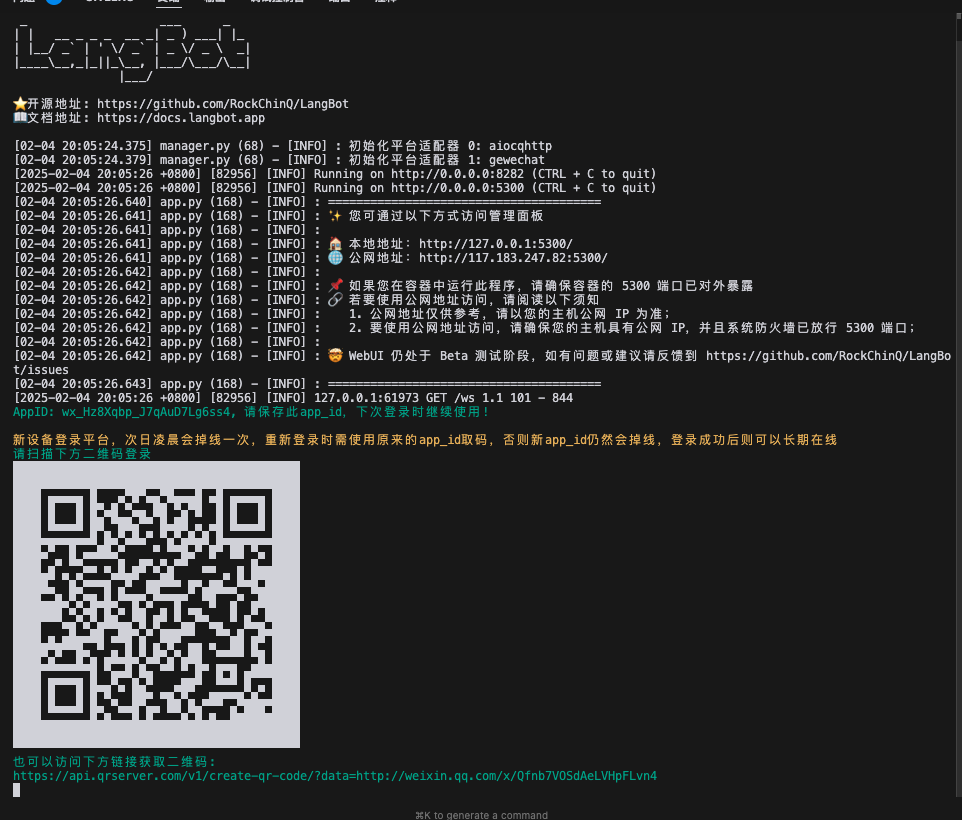
After LangBot starts, a QR code will be displayed, please scan this QR code with your personal WeChat to log in.
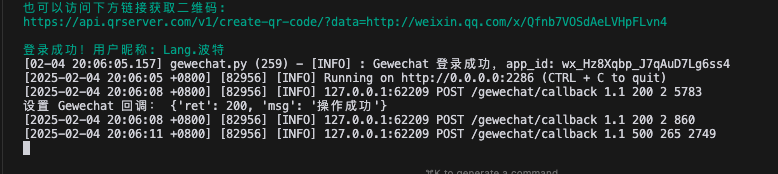
After successful login, login information will be displayed, and it will start listening for personal WeChat messages.
INFO
After logging in, app_id and token will be saved to the configuration file, and you won't need to scan the QR code to log in again the next time you start.
Now you can chat with LangBot in private messages or group chats.